
Need to use an existing photo instead of taking a photo in the app?
- Tap the thumbnail to open the Camera Preview for a Subject.
- Tap on the first thumbnail of the carousel ‘Tap to Upload.’
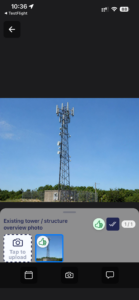
- Tap the Gallery icon and choose your file from your Photo Gallery.
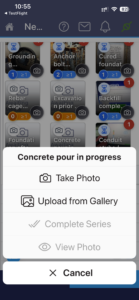
- OR long hold on the Subject thumbnail and select ‘Upload from Gallery’
- These will show a globe watermark to differentiate from app-taken photos.
- These images will not have a location stamp in their meta data. It is not possible to use a gallery photo for a Subject that requires a location.